When a redesign at a Big 5 bank made our pages vanish from Google
How I traced a site-wide deindexing at one of Canada's big five banks to a rendering problem — and got the pages back within weeks.
Background
At a glance
- Role
- In-house SEO specialist
- Site
- One of the big five Canadian banks (tens of thousands of pages)
- Problem
- Pages fell out of Google after migration
- Cause
- Client-side rendering
- Fix
- Server-side rendering
- Result
- Rankings restored within weeks
I was the in-house SEO specialist on a project to rebuild one of the big five Canadian banks' website — a full redesign paired with a CMS migration to Contentful, running on a Next.js codebase. The plan was ambitious: move the entire site, tens of thousands of pages, onto the new stack.
At a bank, nothing moves quickly. Every change runs a gauntlet of approvals, reviews, and sign-offs, and the migration got off to a slow start because of it. At the time that felt like friction. It turned out to be the best thing that could have happened.

When pages started disappearing
We began with a small batch of top-of-funnel blog pages. Almost as soon as they moved to the new site, they didn't just slip in the rankings — they fell out of Google completely. Searches that used to surface them returned nothing. The pages were effectively invisible.
Not an ordinary drop
A dip after a redesign is normal. The accepted wisdom in the SEO community is that you can expect up to a 25% drop in traffic for as long as three months while Google reprocesses a migrated site. So at first, we waited. But this didn't behave like a dip. The pages weren't ranking lower — they were gone, and weeks were passing with no sign of them coming back.
Meanwhile the stakes climbed. The migration was put on hold. We'd just signed on with Contentful, the redesign carried real expectations, and now the whole thing was frozen while nobody could say why and leaders wanted answers.
Chasing the cause
The first thing I did was rule out the ordinary explanation. If this were a standard post-migration dip, the pages would still be indexed, just ranking worse. They weren't indexed at all. That told me the problem wasn't about ranking signals — Google wasn't seeing the pages in the first place.
Meeting with Google
We escalated as far as we could and got a call with Google directly. I'd hoped for a hint about where to look. Instead they told us, plainly, that they couldn't give us any direction at all — doing so would be an unfair advantage. The call was a dead end. Whatever this was, we were going to have to find it ourselves.
What are the bots seeing?
We wanted to get a sense of what crawlers and bots might be seeing on our newly migrated pages. I pulled our URLs up in the Wayback Machine to see exactly what had been captured when each page was archived — and there it was. On the migrated pages, the header and footer rendered fine, but the entire body was blank. Everything between the top and bottom of the page — the actual content — was blank.
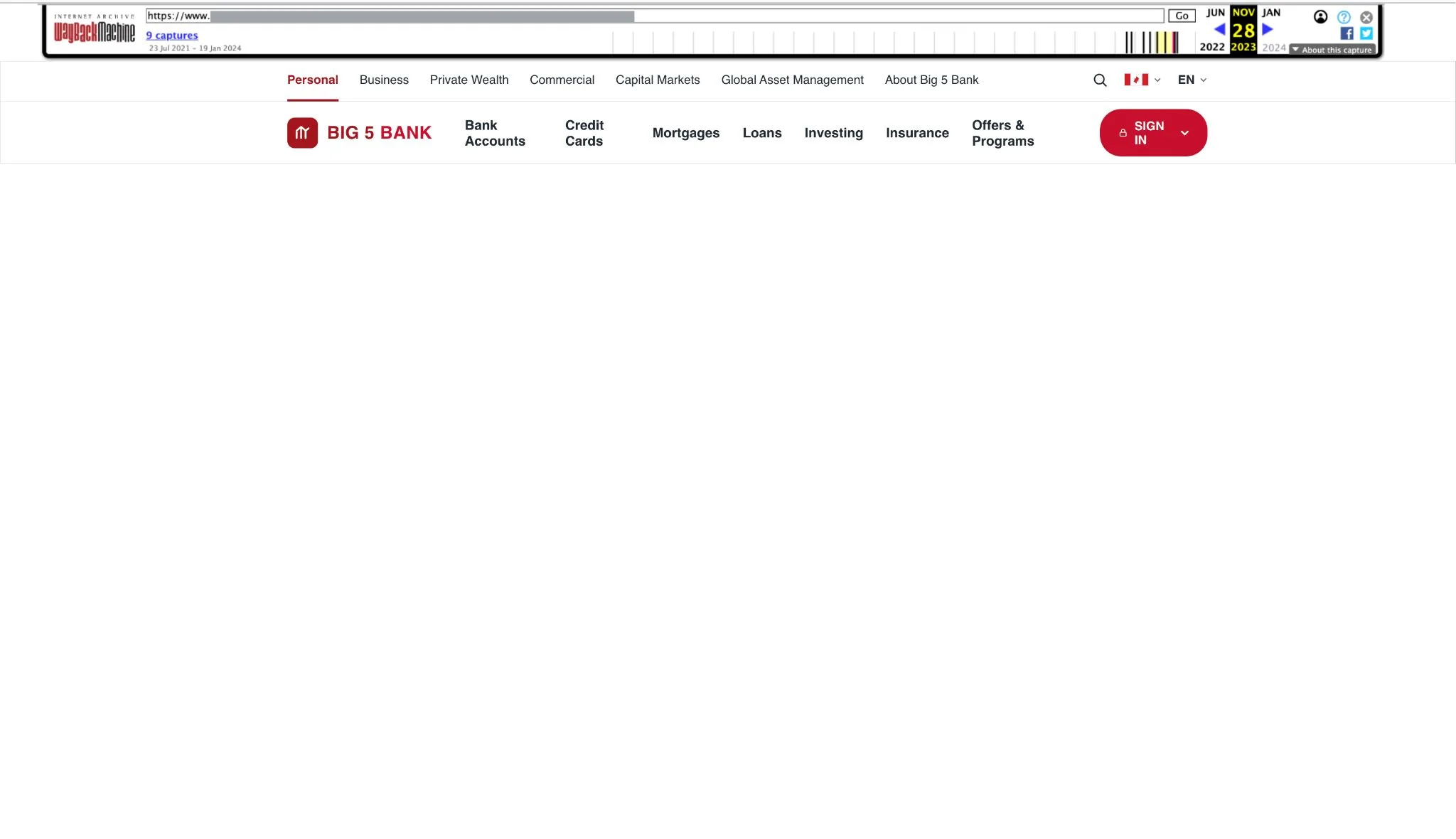

That blank space was the whole answer. The new build was rendering its content client-side: the page arrived nearly empty and then assembled itself in the visitor's browser using JavaScript. A person never noticed — by the time the page was on screen, everything was there. But Googlebot wasn't waiting around to run all that JavaScript. It was fetching the page, seeing an empty shell, and moving on. As far as Google was concerned, we'd published a batch of pages with nothing on them.
The solution
Once I knew what I was looking at, the fix was straightforward to specify. The content needed to be present in the HTML the moment the page was served — not built afterward in the browser locally on the user's computer.
I wrote up the diagnosis, raised the ticket with the dev team to move the affected pages to server-side rendering, and we shipped it. The solution was extremely quick to implement.
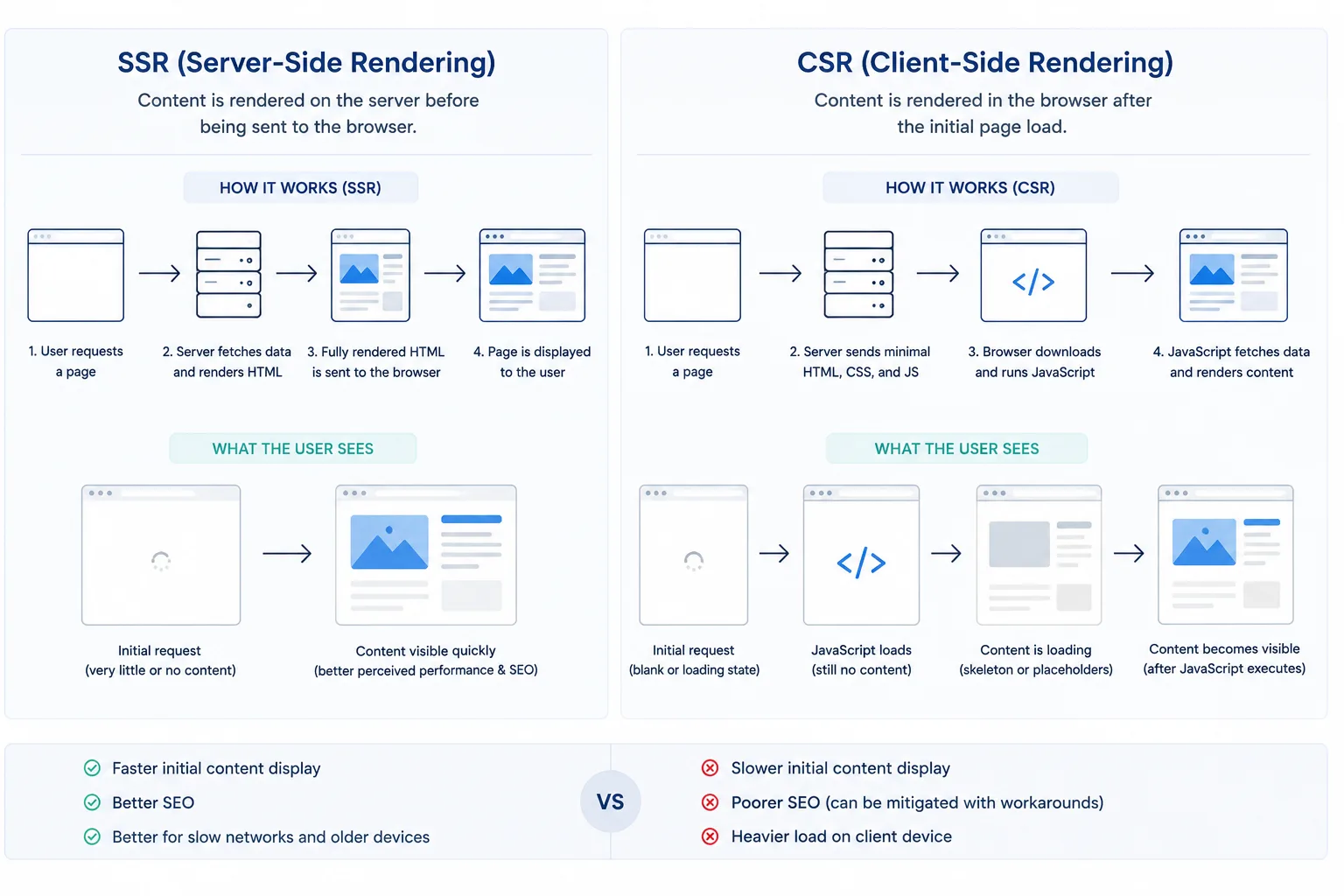
The difference between SSR and CSR for non-technical folks
Every web page has to be built before you can read it — the text, images, and layout assembled into the thing on your screen. The only question is where that building happens, and there are two options.
Server-Side Rendering
Client-Side Rendering
The catch is what happens when Google visits. Its crawler moves fast: it grabs the page the instant it arrives and doesn't hang around. With SSR, the content is already there, so Google sees everything. With CSR, the page turns up nearly empty and the content only appears after the browser finishes assembling it — and the crawler usually doesn't wait for that. So it sees a blank page and leaves.
The results
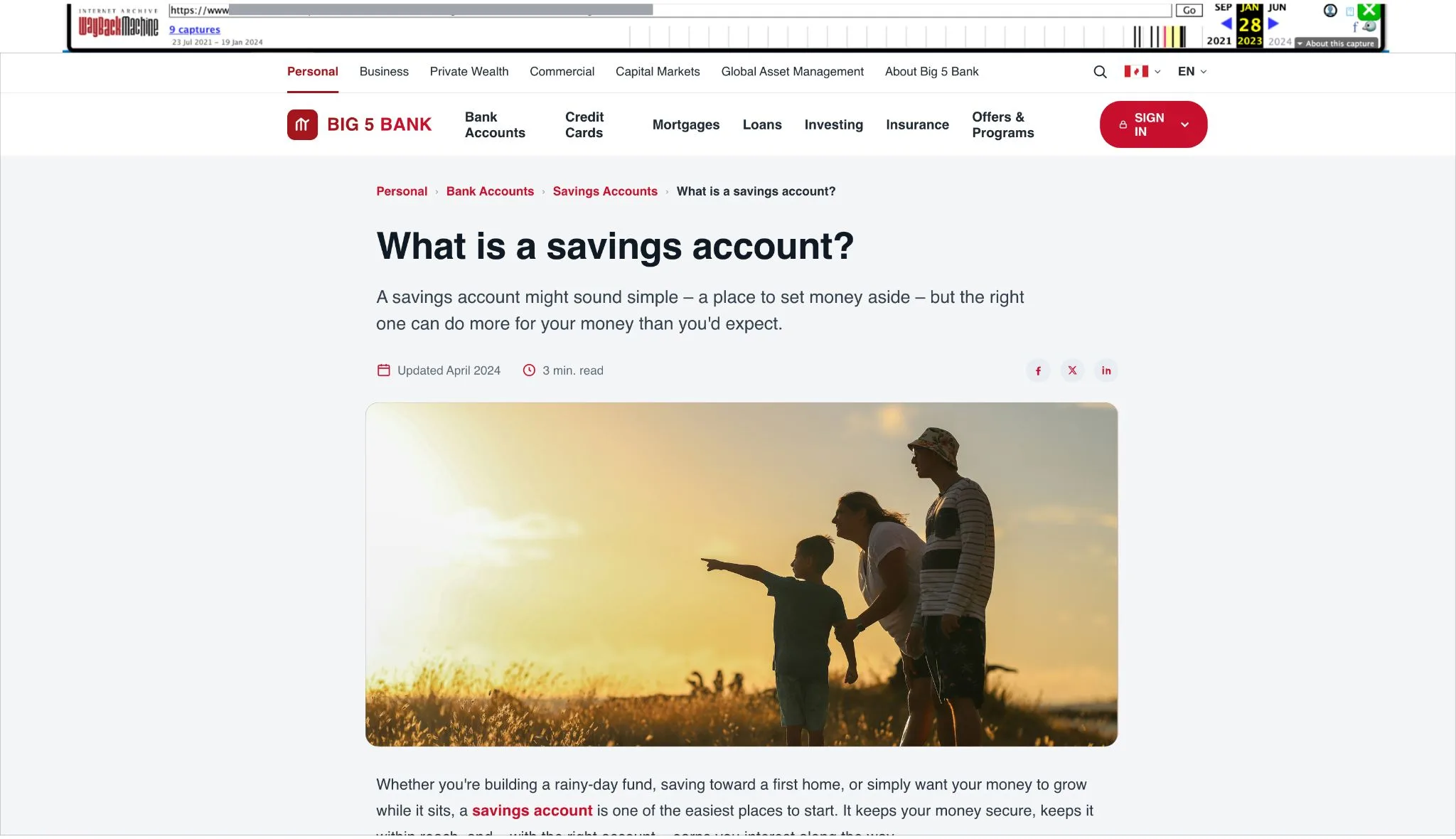
The recovery was almost immediate. Within a few weeks of the server-side rendering fix going live, the pages returned — and came back to the positions they'd held before the migration.
The bigger win was the one that never showed up on a dashboard. Because the rollout had been so slow, only a handful of pages had migrated when the problem hit. If the site had moved at the pace everyone originally wanted, the same rendering flaw would have taken down tens of thousands of pages at once — and we'd have been untangling a catastrophe instead of a contained batch of blog posts. The red tape I'd been frustrated by was the thing that saved the project. My team and I were then clear to resume the multi million dollar website migration.
What I took from it
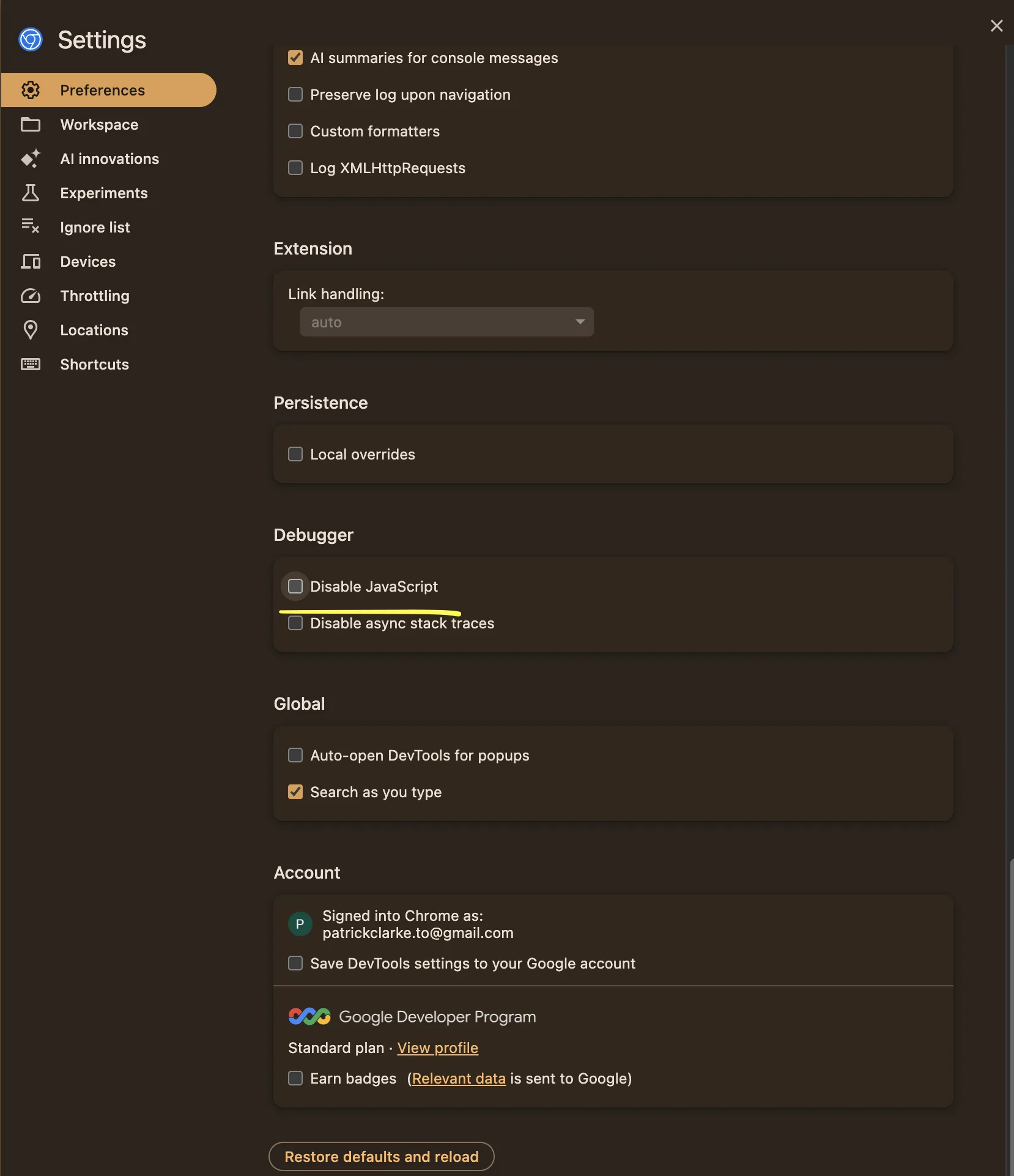
Rendering is now one of the very first things I check when I audit a site. Before I look at content, links, or anything else, I want to know what a crawler actually receives when it requests a page — because if the answer is "an empty shell," nothing else matters.
It's a lesson that keeps paying off. Since then I've run into the same class of problem in several other roles, both in-house and freelance, and each time I've caught it early — saving the team the months of guesswork it cost the first time around.
What this took
Technical SEO · JavaScript SEO and rendering diagnosis · migration QA · reading crawler-rendered output via the Wayback Machine · scoping and shipping the fix with developers · keeping stakeholders steady while the cause was still unknown
Tools & tech: Contentful · Next.js · Wayback Machine · Google Search Console